

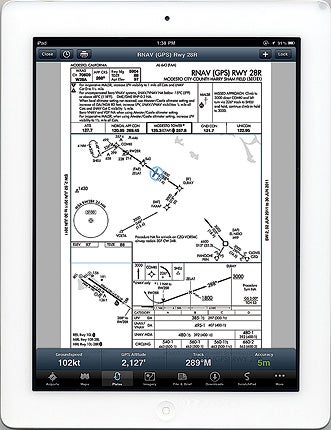
 Georeferenced approach plates are one of the new features available in version 4.0 Pro. |
In the brief time since its introduction, the iPad has become a runaway hit among pilots. That’s partly due to the hardware, which offers a bright color display, touch-screen control and hours of battery life in a package smaller than many kneeboards. But the software is just as important—and of the many aviation apps available for the iPad, one of the most popular is ForeFlight.
Like many iPad apps, ForeFlight got its start on the iPhone, but its developers have taken advantage of the larger display and other capabilities of the iPad to deliver an amazing range of features while retaining the iPad’s signature elegant interface. It’s extremely easy both to learn and use, and works quite well both on the ground and in the air.
ForeFlight’s map view uses most of the display to show your choice of a VFR sectional, an IFR low- or high-altitude en route chart, or a basic geographic map on which you can overlay weather data, including NEXRAD weather radar with echo tops, satellite imagery, wind barbs, dew-point spread, lightning strikes, flight conditions and prices for 100LL or Jet A. The map view also is where you can start preflight planning by laying out a route. You can do this by tapping on waypoints, including airports, navaids and intersections, or by typing the route into a text search box at the top of the map—to which you can append airspeed, fuel flow and altitude. An ATC Routes button lets you check to see if a preferred route is available. ForeFlight supports “rubber-band” routing—tap and hold on a route segment, and the app will add an insertion point that you can move wherever you want it, which makes editing routes easy.
Press the File & Brief button, and you’re taken to a form in which you can add or modify your origin, destination, route and all the other items on a typical flight plan. If you have a live Internet connection—either through WiFi or one of the 3rd Generation (3G) cellular networks the iPad supports (AT&T or Verizon Wireless)—you can get a complete DUATS briefing, and also file VFR, IFR or the special form of VFR used in the Washington, D.C., Special Flight Rules area. DVFR flight plans used to cross international borders aren’t currently supported (as DUATS discontinued support for those). Copies of flight plans you’ve previously filed are retained, so over time, you can build a library of plans that can be easily updated and used on future flights. Beyond the typical text weather briefing, an Imagery button gives you access to graphical AIRMETs/SIGMETs, turbulence, icing, looping or static Doppler radar, prognostic charts, PIREPs, infrared and visible satellite, winds aloft and TFRs.
There’s one more critical step before leaving for the airport: Press the Downloads button to show settings, and download charts for the areas where you expect to fly. Otherwise, when you leave your local area, ForeFlight will prompt you for an Internet connection, and unless you can provide that, you’ll find parts of your maps are blank. You can choose which charts and types of data to download on a per-state basis, which minimizes download time.
With a route planned and briefed, and the necessary data downloaded, you can head for the airport—and this is where one of the latest features in ForeFlight Mobile HD 4.0 Pro shines: optional georeferenced airport diagrams and approach plates based on data provided by Seattle Avionics that show your exact position. I personally didn’t think this feature was worth the additional cost until I tried it, but now I’m sold: Have you ever gotten lost at an unfamiliar airport? I have. With georeferenced charts, it’s very clear which taxiway you’re on! ForeFlight strongly recommends that pilots use the georeferenced diagrams and approach plates with an external Bluetooth GPS. Pilots flying in IFR conditions should only refer to georeferenced charts when workload permits.
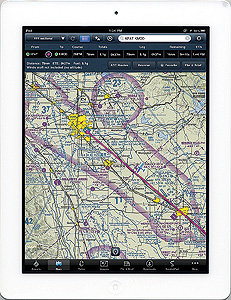 |
In flight, I find the VFR sectional and IFR en route charts easy to use. The standard one-finger pan and two-finger zoom gestures used in other iPad apps work fine in ForeFlight, and are far more natural than other aviation map displays. As with the georeferenced airport diagrams and approach plates, an airplane symbol is superimposed on your chart, and a band at the bottom of the chart will show configurable performance data (groundspeed, altitude, GPS track and GPS accuracy by default). Of course, this requires a GPS—which is built into 3G iPads. If you have a non-3G model, you’ll need an external GPS, which ForeFlight also recommends for additional reliability when using georeferenced charts. The result isn’t a true moving map—the charts are always static with the airplane moving over them, and there’s no option for a track-up mode (you can press the crosshair button to make the map auto-scroll with the aircraft staying centered).
ForeFlight’s weather features really aren’t intended for in-flight use, but I’ve been able to get updated weather, including composite-reflectivity NEXRAD with echo tops, using my iPad 2’s AT&T 3G cellular modem at low altitudes. Stored weather information from your preflight briefing is always available, which can be useful.
ForeFlight also provides airport data from AOPA, including (in most cases) a diagram showing FBO location, local radio frequencies and telephone contact numbers, runways and navaids, NOTAMs, local transportation, restaurants, hotels and operating hours. The Airports page also provides links to the appropriate FAA Airport/Facility Directory (A/FD) page, and to any instrument approach procedures for the airport.
I have two minor gripes: You can view weather or an aviation chart, but not both at the same time, and despite the best efforts of the developers, I still need to carry a clearance pad and pen. ForeFlight offers a ScratchPad function that operates in two modes: Type mode requires you to type with the on-screen keyboard, which I find acceptable on the ground but not in the cockpit; while Draw mode uses your finger. The result looks too much like a kindergarten Etch A Sketch for my taste, and it’s limited to one page with no way to scroll up or down for more room.
That aside, on my last four flights all the other paper has stayed in my flight bag as ForeFlight provided everything else that I needed: flight-planning forms, navigation charts, airport diagrams, AOPA and A/FD airport info, approach plates, SIDs, STARs and weather briefing with imagery—all up to date, provided I took a few minutes to download revisions before flying.
Twelve years ago, I wrote the first review of an electronic flight bag (a Microsoft Windows-based device called the eFlightPad) in Plane & Pilot. I was thrilled with the capability, and hated to give it back after my review—but I couldn’t afford over $6,000 dollars to buy one. With ForeFlight, my $729 iPad 2 has at least as much capability in a much more reasonably sized and easier-to-use package, with no less than an honest 10 hours of battery life.
Like all iPad apps, you’ll find ForeFlight Mobile 4.0 Pro at Apple’s iPad App Store. It’s free for 30 days, and includes live data, but to enable full functionality (including downloads for off-line viewing), you’ll need a data subscription. The full Pro data set, including georeferenced airport diagrams and approach plates covering the entire U.S. and southern Canada, costs $149 per year, which is twice the cost of a standard data subscription. For more information, browse www.foreflight.com.


