

 |
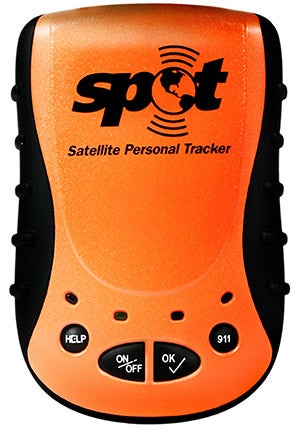
| The Spot device lets users send OK, Help and emergency messages. |
My first exposure to the Spot Satellite Messenger came on a rainy March afternoon when air show pilot Gene Soucy arrived at the NAS Meridian Air Show in Meridian, Miss., where we were both performing. Gene got out of his Showcat biplane, shook my hand and said, “hello,” then pulled a little orange device out of his pocket and hit a button. He explained that he had just checked in with his coperformer, Theresa Stokes, by sending her a message that he had arrived safely. I asked the obvious question, and he said, “It’s a Spot, man, you need to get a Spot.”
The previous afternoon, I had barely made it from California after racing a line of thunderstorms that were developing across the South. It was one of those VFR-only trips across an area in Texas that, 15 minutes earlier, Flight Watch had said was 1,500- to 2,500-foot overcast with no weather between Dallas, Texas, and Shreveport, La. Then, all of a sudden, I passed over a little hill, and the ceiling had dropped to about 500 feet with poor visibility that was decreasing rapidly because of rain that began to fall. I hit the nearest button on my GPS and hustled my way to Mother Earth at an airport that was only eight miles away. It all worked out, and after a nice lunch with the local airport crew, the rain stopped, the ceilings lifted, and I was on my way again. I wasn’t very happy, however, to have reminded myself about how much I hate being scared in an airplane.
Recalling my trip across the stormy South the day before, I had to wholeheartedly agree with Gene—I really needed a Spot. After all, my Edge 540 is purpose-built for aerobatics, so it has about as much instrumentation as the Spirit of St. Louis did. And because it’s a single-seat airplane in the experimental-exhibition category, it doesn’t even have an ELT. When I’m traveling, I’m always thinking about how easily things can go wrong.
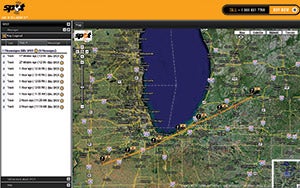 |
| Spot’s website displays Bill’s flight path on a cross-country from Battle Creek, Mich., on a Google Earth map viewed in Hybrid mode which combines map and satellite images. |
Spot is an ingenious electronic device that’s essentially a combination GPS (for gathering location information) and satellite phone (for sending information to the Spot system). Spot can communicate preprogrammed messages around the world, even where cell phones won’t work. You can send e-mails and text messages to cell phones, and you can also set up a website that tracks your recent messages overlaid on Google Earth satellite and terrain maps. It’s the only device of its kind; it’s small and it weighs less than half a pound. It could very well be the difference between being found and saved. As the advertisement says, “Having a Spot takes the search out of search and rescue.”
Functions on the Spot are pretty straightforward. When things are going well on your trip, you can send an “OK” message to inform others of your location and status, and you can set the Spot to send tracking messages to your Spot website every 10 minutes. If things get hard, you can send a “Help” message to friends asking for assistance. If you end up in a perilous situation, you can hit the “911” button and transmit information to emergency services that includes your name and location—updated automatically every five minutes. There’s a notepad in your account where you can enter additional information for emergency services—mine states, “I am a pilot and have probably had a problem while I was operating a very small airplane.” This will let them know a little bit more about what and whom they’re looking for.
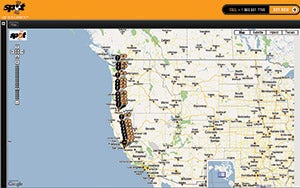 |
| When Bill delivered an Extra 300L from Watsonville, Calif., to Friday Harbor, Wash., the owner was able to track the arrival of his new plane in real time. |
My Spot is an important piece of safety equipment, but it’s fun too; friends and family can see where I am along my journey. Recently, I sent my Spot website to the new owner of an Extra 300L that I was delivering so he could track when his new toy would arrive. It’s also a comforting feeling to have people who are invested in my well-being know my whereabouts, especially when I’m over the mountains or if I’ve made an unplanned course deviation to get around weather systems. My Spot website will retain my track for seven days, which allows me to review and relive my trip after the fact.
There are some things I’d like to see develop during Spot’s evolution. I confess that I’m a little worried about accidentally hitting the 911 button and having GEOS Alliance send a rescue helicopter when I don’t need it. This situation would be embarrassing and probably very expensive. I’d like to have a cover over the 911 button that has to be removed or pushed out of the way before calling for serious help.
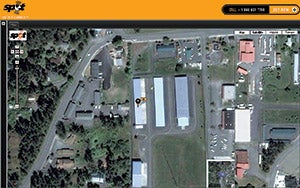 |
| Bill checks in with an OK message once he’s safely on the ground at an airport hangar. |
I’d also like to see location data displayed on the device. If I end up in the wilderness and still have a sectional in my flight suit pocket, it would be helpful if Spot could tell me exactly where I am. A latitude/longitude display would be enough for emergency use to try to get to the nearest town, high ground or water source. Another feature that would be useful would be an arrow on the display that points north to keep me on track during my walk out. (Additionally, it would be great if Spot featured the ability to overlay weather information on my Spot website so that my homegrown “flight watch” friends could see what issues I was working with during a trip.)
Spot uses the Globalstar communications network, a LEO (low earth orbit) satellite constellation (48 active satellites and four spares). Reportedly, Globalstar has had equipment problems that mostly affect satellite-dropped calls; industry analysts speculate that the cause is radiation in the South Atlantic Anomaly. In addition to replacement satellites being put into orbit, new second-generation satellites are being developed with launches scheduled for 2009, so the coverage numbers should continue to improve over time. To manage this issue now, Spot sends each tracking and OK message three times to maximize hitting a communications window and getting the message through. If an emergency 911 message is sent, it’s repeated until the SPOT is turned off, so these types of messages should always be received in pretty short order. The Help request to friends sends a message every five minutes for an hour, so these requests should also be extremely reliable. In my experience, the coverage for tracking messages has been excellent for all of my trips across the country, and when our P&P Editor took her Spot to Greenland in a C-130, I was able to track her in remote areas on the ice cap.
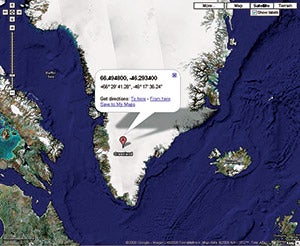 |
| An OK/Check-in message sent from the ice cap in Greenland displays GPS coordinates sent via e-mail and text messages. |
The device is priced at $169.99 and can be purchased at the company’s website. Satellite service starts at $99.99 per year. The bottom line is that if I ever go down and need to be saved, I’ll be very happy to have Spot in the left front pocket of my flight suit and to have spent the extra $7.95 on an emergency assistance policy. When I tell my friends that they need a Spot, I mean it! For more information, visit www.findmespot.com, or call (866) OK1-SPOT.
Bill Stein performs a solo act in his Edge 540 (www.billsteinairshows.com) and with the Collaborators (see Pilot Journal Nov/Dec 2007).


