

 |
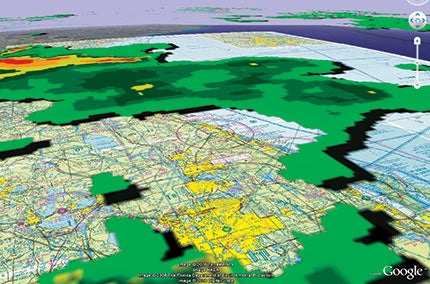
| Severe weather over Florida. |
To this day, I can remember a rather “interesting” experience that occurred on a long solo cross-country while I was pursuing my private pilot license (almost 20 years ago). The time to my last waypoint, the destination airport, had expired, yet the field was nowhere in sight. After a few moments of panic and rechecking of numbers, I looked down, and (aha!) there it was.
Anyone who has flown long enough can appreciate how this type of scenario can happen. Flying in unfamiliar territory and into strange new airports can be quite a task, primarily because you’ve never seen the scenery before. Try finding some obscure grass strip down south—it’s like looking for a needle in a haystack. Even with the fanciest GPS units guiding you, it can still be hard to identify certain things from the air. But it doesn’t have to be that way anymore. Now, before you even get in the airplane, you can use sectional chart overlays on Google Earth to show you exactly what to expect on a flight. Best of all, it’s free!
Getting Started
Download Google Earth at earth.google.com. (Because it’s frequently updated, be sure that you have the latest version.) Next, log on to www.wikihow.com/Overlay-Sectional-Aeronautical-Charts-in-Google-Earth. (Type this address exactly as it appears here; if you lowercase the “A” in “Aeronautical” or capitalize the “i” in “in,” the link won’t work.) Scroll down to “Sources and Citations,” and click on “Sectional data download.” Once the sectional data has downloaded, you should see a folder labeled “Aero Charts” under “Places” in the Google Earth sidebar.
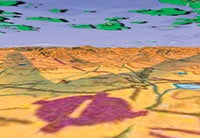 |
| An uncontrolled airport near Crawford, Colo. Google Earth allows pilots to visualize terrain, buildings and weather, among other things, over sectional charts. Additionally, they can familiarize themselves with unfamiliar airports, checkpoints and destinations with this invaluable flight-planning tool. |
Within the aero chart folder there are four options. There’s an “About” item so you can learn more on the overlay feature. The last three options are the most interesting: sectional charts, terminal area charts and 3D airspace. If you have the latest sectional data and an updated version of Google Earth, when you click on “Sectionals,” every sectional chart will be superimposed on the correct spot. The same applies to terminal area charts. Three-dimensional airspace can be added so that you can view what Class B or C airspace will look like from any angle or altitude. (Keep in mind that none of these charts or overlays can be considered current. They should not be used for purposes of actual navigation!)
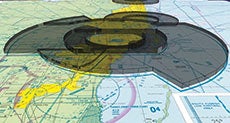 |
| A 3D view of Miami Class B airspace. |
Within the aero chart folder there are four options. There’s an “About” item so you can learn more on the overlay feature. The last three options are the most interesting: sectional charts, terminal area charts and 3D airspace. If you have the latest sectional data and an updated version of Google Earth, when you click on “Sectionals,” every sectional chart will be superimposed on the correct spot. The same applies to terminal area charts. Three-dimensional airspace can be added so that you can view what Class B or C airspace will look like from any angle or altitude. (Keep in mind that none of these charts or overlays can be considered current. They should not be used for purposes of actual navigation!)
Plan Your Flight
Now that the overlay data is loaded on your computer, let’s look at how it can make your life tremendously easier when planning a flight. Zoom in on Tampa, Fla. If you’re not sure where that is, just type “Tampa” into the “Fly To” box in the Google Earth sidebar. Next, click on “Sectionals,” which will overlay the whole gamut of sectional charts on top of the Google Earth satellite imagery. You should see Tampa International Airport, Vandenberg Airport, MacDill AFB and Peter O Knight Airport. As long as you have “Roads” selected under “Layers,” major roads and their names/designations will still appear through the sectional chart. At the bottom of the “Places” box (underneath the sectional chart names), you’ll see a sliding scale. This allows you to “fade” the sectional overlay. Try it out. It will allow you to compare what the sectional shows with what you can really expect to see from the air. Never been to Peter O Knight before? Take a look and check it out. Once you’ve seen what it and the surrounding areas look like, it will be rather hard to miss.
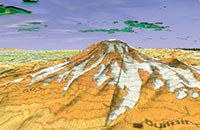 |
| Mount Rainier in Pierce County, Wash. |
But it gets even better. You can adjust your vantage point in Google Earth to match the direction from which you’re flying and even approximate the view from your proposed cruise altitude. Using Peter O Knight, let’s say you’re planning to arrive from the east. Use the navigation tool at the top right of the screen (the one with the eyeball on it) to rotate the image so that west is at the top of the screen or straight ahead (and north is facing to the right, as indicated on the eyeball tool). Next, use the shift and down arrow keys to adjust the “altitude” of your view. (For keyboard help, click on “Help,” then “Keyboard Shortcuts.”) You’ll also need to use the tool with the hand on it to create the right perspective of an arrival from the east. You can see your current eye height in the bottom right corner of the Google Earth screen. Set it to around 4,500 feet. Back yourself up to U.S. 41 (just to the east). Now you can see exactly what an arrival will look like. Shift back and forth between Google Earth and the overlaid sectional to compare notes. You can even add in 3D buildings (under “Layers”), which will show you what downtown will really look like. Interesting, eh?
Let’s try something harder. Type “Bishop Harbor” into the “Fly To” search box. Using the same sectional overlay, look just northeast and find Manatee Airport, which is a typical grass strip. Using the overlay fade slider, check out how it blends into its surroundings. Also note how the sectional doesn’t depict the lakes and factory just south of the field. Once armed with this visual data, it would be hard to miss Manatee. Use the different navigation tools to check out what it looks like from different directions and altitudes.
Ever wonder if you’ll be able to see a checkpoint from the air? Take the guesswork out of it by looking at Google Earth before banking on a particular location. For example, look just southeast of Manatee Airport and see what you think about using the city of Parrish. With Google Earth, it will certainly be a lot easier to find because you’ll know exactly what to look for! Such a preflight check is also a good technique to use when evaluating road intersections, whether you can see a railroad clearly, or what a little stream or other body of water looks like from the sky. By taking the time to perform this simple reconnaissance, you can practically eliminate the chance of getting lost at the hands of crummy checkpoints.
| Google Earth Flight Simulator |
|
Getting “into the air” is easy as long as you have the latest version of Google Earth (earth.google.com). Click on “Tools” in the upper left part of the page. This will reveal several options, one of which is “Enter Flight Simulator.” A pop-up window will appear that allows you to select either an F-16 or a Cirrus SR22. Basically, the two “fly” the same, but at different speeds. You’ll also have the option of picking a start point and activating a joystick, if you’ve got one available. Make your appropriate choices, and then you’ll be ready to fly. Advertisement
Once you’ve settled on where you want to start your flight, you’ll see a heads-up-display (HUD) that relays all the critical flight data, such as altitude, airspeed, heading and a whole lot more. To make sure you don’t crash on your first attempts at flight, take a look at the flight simulator user’s guide: earth.google.com/userguide/v4/ug_flightsim.html. You can add or subtract a variety of visual goodies while you’re flying around. By selecting “View” and then “Sidebar,” you’ll see a list of available layers and overlays for your selection. Amazingly, you can fly around on a sectional chart, add 3D buildings and incorporate 3D terrain along your proposed route of flight (some features are pretty graphic-intensive, so even newer computers will lag). There’s very little you can’t do with Google Earth flight simulator. Try it out before your next flight. No doubt, you’ll be impressed! |
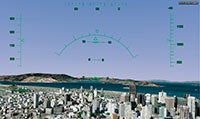 It used to be that if you wanted some heads-up about an upcoming flight, you would look at some charts and books, then for the truly hard-core, perhaps perform a test flight with Microsoft’s Flight Simulator. Now there’s something even better—a flight simulator module in Google Earth. While not the most sophisticated simulation around, it does allow you to cruise along at realistic speeds and with flight-attitude specific views.
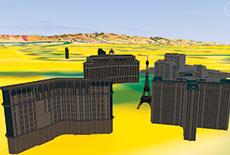 |
| A 3D building view of the Las Vegas Strip. |
Another neat feature: 3D terrain is built into the sectional overlay. Type “Red Lodge” into the “Fly To” box. Zoom out a little bit, and be sure that “Terrain” is selected in “Layers.” Take a look to the west while tilting your eye altitude down to check out the surrounding mountains. Welcome to Montana! Can you imagine flying into this airport at night for the first time without looking at it from this perspective? Cycle between the sectional and Google Earth to gain even more perspective. Of course, the use of Google Earth to evaluate terrain shouldn’t be limited to the immediate terminal area or restricted to VFR flights. Want to know why a departure procedure calls for a particular climb gradient? Check it out on Google Earth. Why are minimum IFR altitudes so high along a particular route? Ask Google Earth for some help.
And just when you thought it couldn’t get any better, Google Earth has yet another surprise. See where it says “Weather” under “Layers”? Click on it. If you expand the menu (hit the box with the plus on it), you can select to display weather conditions, satellite views and radar returns. Of course, this is overlaid on not only Google Earth, but also on the sectional chart, if you so desire. Pick somewhere rainy, and try it out. Zoom in on the location, select the appropriate sectional and call up the weather overlay. You’ll probably never fly without it again!
There’s little doubt that Google Earth can be of great assistance in the flight-planning process. It’s an invaluable tool to use when choosing a suitable route because it helps you find reasonable checkpoints. It can also keep you out of trouble with terrain in all types of operations. And it makes finding airports a cinch. All it takes is a few minutes of downloading to arm yourself with one of the most powerful flight-planning tools available. Best of all, if you use Google Earth, you’ll be one of the few pilots at the hangar who doesn’t have an embarrassing “getting lost” story to tell.
| Texting Google |
|
Along with Google Earth, search functions and Gmail, here’s another cool feature that Google offers. You can get METAR information sent as a text message to your cell phone by texting “metar” followed by the ICAO airport code (for example, “metar KSMO,” for Santa Monica Municipal Airport in Santa Monica, Calif.) to 466453 (“GOOGLE”). The system also offers other useful information such as weather, airline flight status or even directions for once you’ve landed at a new destination. Full details are at www.google.com/intl/en_us/mobile/default/sms/index.html. |


